iTunes is iAnnoying

Too bad the iPhone makes you get sucked into the world if iTunes – because it sucks.  I knew this going in, but it still isn’t fun when the limitations smack you in the face.

The limitation of which I speak is its inability to detect new files in its directories, automatically update its library database, and make it available for syncing and playing.  I spent a while fumbling around the UI looking for the option to turn it on, only to be ultimately disappointed by a few google searches. 

My initial plan was to take home movie clips (btw, MediaCoder is pretty handy..) and drop them into a directory managed by iTunes so they’d automatically get sent to the phone, but now I was going to have to add additional steps of manually adding the new videos each time they get created.  That’s just too much work and I’m too lazy.

I ran across an app or two that would do this updating for you, but instead decided to go a different route – creating a podcast that iTunes would auto-update and sync to the phone.  Tuesday night I whipped up an ASP.NET request handler (IHttpHandler) to generate feeds based on directory contents.  So now I’ve got the auto-updating capability I was initially looking for: after I create the video, I just drop it into a directory accessible by my webserver and iTunes will pick it up the next time it requests the feed.  As an added bonus, David now has a podcast for family and friends :)

Some more details on the code below the break.

Continue reading

Ammo and… backups?

OK, just a few more words about my data backups.

Last week I ordered a few Army Surplus, 30 Caliber Ammo Cans, they arrived today.  What the heck are these for, you ask?

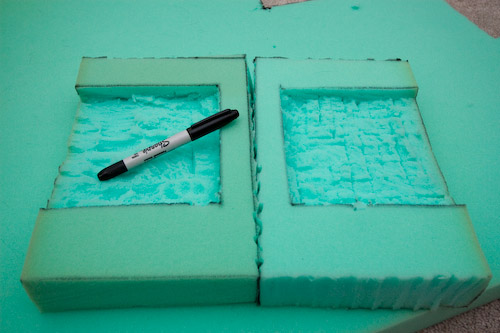
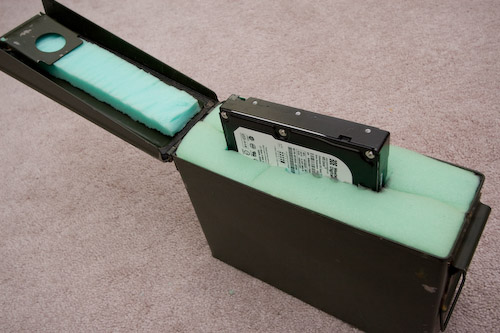
Well I thought they could make a great way to transport and store the hard drives I’m going to be rotating off-site.  So tonight I got to work with a knife and some dense foam, to create what should be a pretty sturdy (and water-resistant!) hard drive case.

And here it is, with a spare drive not quite halfway pushed in.  The foam cutting was crude, and it may not be pretty, but I like it.

The cans are $4 apiece + shipping.

iPhone

My 2.5 year-long haitus from being connected on-the-go is over.  I finally took the plunge and switched from Sprint to AT&T and bought an iPhone (8GB).  Sprint has provided great service over the past 5+ years, but their phone selection has been lacking.  Sorry, Sprint, the HTC Touch Pro and/or Diamond just don’t compare.

Backups and my first foray into PowerShell

First, some background.

Last week I received the final pieces of my backup strategy, a pair of 500 GB hard drives that I will be rotating periodically to some undisclosed location that isn’t my house.  Right now, my fileserver makes backups and sticks them on a mirrored RAID array.  These drives are simply to hold extra copies of these backup files in the event of something Very Bad(tm) happening to our house.

Since it will be leaving my house, I decided I wanted to make sure the data was wrapped up in a nice blanket of encryption goodness.  For ease of use, I have an eSATA docking station that allows the drives to be ‘hot-swapped’ – and for further convenience I’m attaching it to my desktop instead of the server so that it will be harder to forget to rotate the drives out (in the basement = out of sight, out of mind).

So all of this presented an opportunity to learn the relatively-new command line environment, Microsoft PowerShell

The scripts (feel free to download) do the following:

  1. Mount my hard drives as encrypted TrueCrypt volumes, using a keyfile.  Now anything written to the drives are wrapped in that nice encryption blanket I mentioned earlier.  Mmm… scrambled bits and blankets.
  2. Checks the amount of space available in the target directory and deletes the necessary number of old backups to make sufficient room for the new backup copies.
  3. Calls on RoboCopy (included in Windows Vista) to do the actual file copying.  Note that in my testing, I found RoboCopy to be 3-4 times as fast as xcopy across the network.
  4. Sends off a completion email
  5. Dismounts the encrypted volume

Since this was my first use of PowerShell, I’m sure there is a lot of room for improvement and that I’ve only just scratched the surface.  That said, I learned enough about PowerShell that I’m going to keep pushing to learn more.

A few things I like:

  • It was very easy to use several diffferent MS technologies from the one script.  I seemlessly use .NET objects, COM objects, and even pull in some WMI interaction to get the job done.
  • Finally having regular expressions available as first-class citizens in scripts – a.la perl and others.  No absolute need to explicitly fire up the .NET regex classes all the time, even though that’s definitely possible and useful too.
  • Finally not having to rely on essentially screen-scraping command outputs. Yay for objects!
  • Writing custom cmdlets in C# is pretty straightforward.  I started down this route to make my own Start-Backup cmdlet, but decided against it since I specifically wanted to learn PS scripting and not just write the solution in C#.

A few things I dislike:

  • using -lt and -gt (and similar) instead of “<” and “>” for comparisons and equality.  It just feels wrong.
  • Lack of an official language reference – I couldn’t believe one wasn’t available, and this left me in the dark and learning by trial by error on some key behaviors of powershell (like function return values, for instance).  The “documentation pack” has a crappy quick-reference/cheat-sheet sort of thing, but not a real spec.
  • How hard it was to track down the PowerShell SDK – note: you have to download the Windows SDK and blindly choose a few installation options to get the SDK installed.
  • I made the PowerShell crash a few times.  That shouldn’t be able to happen.

Heights and XM Radio

A couple of months ago I purchased a Terk XM6 XM Radio Antenna because the reception I have been getting in the office has been poor and unpredictable.   Due to some procrastination, the new antenna has been sitting in its packaging waiting to be installed ever since.

Until today.  This morning I decided it was time to get back up on the 2nd storey roof of my house and replace the now-inactive Wifi antenna with XM.  I’m not a fan of being that high up, particularly on a cold and windy day.  In fact, as I climbed up the ladder and took a look at my target, I came very close to saying screw-it and just mounting the antenna on the side of the house.

Not to be easily defeated – I pushed ahead and swapped the antennas.  I had to run new cable (RG6 Quad Shield) instead of using the existing, superior cable (LMR400) so that I could get the appropriate connectors attached.  Due to how securely Jay put that other cable up, and how cold it was, I decided I’ll make another trip back up in warmer weather to pull it down :)

So now my office has an XM jack, 100%  (versus maybe 20%, according to the receiver) signal reception, and won’t cut in and out when someone walks through the room!   The project isn’t completely done, however;  I need to order a 2.4Ghz splitter so I can feed the signal to the basement and possibly another room in the house in the future.

Favorite Software?

Leaving development tools aside (ahem, Visual Studio, ahem), what are your favorite software titles?  You know, the ones you use daily, are truly useful, you couldn’t live without, and are just plain fun.  Here are mine, in no particular order:

  1. Microsoft OneNote 2007 – This is such a little known piece of software, but one that organizes almost everything I do throughout the day.  I’ve taken a few recommendations from some sites here and there and implemented my own Getting Things Done (great book too) system using OneNote.  If you find yourself scribbling down things on paper or typing things up in random text files that are strewn all over the place, you should give OneNote a try.

    I’ve got two notebooks setup, one for work and one for everything else.  They both have pretty much the same structure/sections: Today; Current Month; Active Projects; and Archive.  Each of those contains pages with information tagged with customized OneNote tags (Processing, Project, Follow-up, etc).

  2. Adobe Photoshop Lightroom 2I’ve mentioned it here before, I know, but it’s great software that takes care of all things photos.
  3. TrillianI’ve been using this multi-service chat client for many years now.  It works and is always running on my machine.
  4. TrueCryptTransparent and on-the-fly encryption.  What’s not to love.  I use it in conjunction with the next entry.
  5. KeePass – A couple months ago I got sick and tired of resetting my passwords on a slew of online sites.  So I found this great utility.  I’ve always avoided using password keepers in the past, but finally gave in.  It takes security serious, and I store its data file in a TrueCrypt volume.
  6. Snaptune One – They appear to be out of business now, but I use it to record AM/FM radio with my RadioShark on Vista, since the original software doesn’t work on Vista.
  7. Windows Media Encoder – I don’t use this nearly as much as I used to, but recently got it back up and running.  I use it in combination with Windows Media Server to stream XM Radio and the RadioShark, so on the rare occasions I’m not here at my desk, I can still have audio choices.
  8. ISO Recorder – I make images of the mini-dvds from my camcorder.

Anyone care to share their favorites?

Lightroom 2.1

Adobe releaed the much awaited 2.1 update to Lightroom this evening.  I’ve been using version 2 for a couple months now, and found it to be head and shoulders above version 1.x.  There were definitely performance problems, but once I made a few performance tweaks, it was usable and worth the headache for the new features.

I just installed 2.1 and gave it a very quick walk through.  So far, it appears they have done a great job on the performance issues.  The general UI is back to being as snappy as I remember 1.x being, and the local adjustments brush introduced in 2.0 is now nearly instant even without the tweaks mentioned above.  Way to go Adobe, and thank you!

I haven’t even looked at the feature list for 2.1 yet, I wonder what else was added…

Photo Hosting

I have hosted my own photo gallery for around 7 years now and have been perfectly happy with my arrangement.  I first started with a homegrown php photo album and used that for a year or two before moving to Gallery, which I have used since.  In addition to using Gallery to display and share my photos, I used it as my archive of sorts – every photo was stored and backed up from there.

That changed last year when I purchased Lightroom and my Canon 30D.  It quickly became the home of all of my photos and I’ve since only uploaded select ones to Gallery.  Backups are all handled directly on the Lightroom catalog and managed directories, and Gallery has pretty much turned into a mess.  Disk space has also become annoying as I’ve moved my Apache web server into a virtual machine.

These things, in combination with my recent purchase (rental? lease?) of a MotionBox account for videos has gotten me thinking more and more about how I want to handle pictures.  Primarily I want more bandwidth, to ignore disk space concerns, prettier photo galleries, room to expand (customization, maybe even selling photos?, I don’t know yet), and a stable provider with a good history.

So I’m trying out SmugMug.com.  They seem to fit the bill for all of the above, at a reasonable price.  It’s a 14 day free trial, so be looking for an announcement about my Gallery being shut down and some things moved to my SmugMug account.

Stay Tuned!