San Francisco Vacation: Photography

Here I sit after day 5 of our vacation, having taken 1,217 photos and recorded approximately 35 minutes of video.  As is always the case, juggling the dslr and camcorder turn into quite an exercise. 

This time around though I’ve taken a slightly different approach to video.  Instead of trying to capture everything I can, I have been looking to record as many small clips when possible with knowledge that any video taken is going to be used as a part of a vacation DVD as a compliment to photos. What doesn’t go into a final video will probably just be posted here – so small standalone clips are preferrable.  This will greatly reduce the amount of boring video segments I have recorded – bonus!

Now that I’m spending less time holding the camcorder, I’ve had more time to be more thoughtful with the still photos I’m taking – which I enjoy far more than video.

On to the photo side of things, a few notes:

  • I brought 4 lenses with me: 10-22mm, 28-135mm, 50mm, and 100mm macro.  I left the 70-300mm at home due to travel constrains; there have a been a few times I wished I had it but it’s just too cumbersome to carry.
  • I typically only use the 10-22 for wide landscape shots and avoid it for people due to its distortion effects at lower than 20mm.  But on this trip I’ve relied on it for a very wide variety of shots, including people, and have been very happy with the results.  I’m surprised by that.
  • Shooting in a forest is difficult.  Shooting in a forest while moving 15mph even moreso.  I spend 90% of my time shooting in Av mode (aperture priority), so every few moments I was having to adjust f-stop and iso to keep motion blur at bay.    -1 to -2 exposure compensation seemed to be a  good override for the camera’s metering to preserve the forest feel.
  • Once again, such a great camera bag for travelling.  I switch lenses A LOT.
  • I’ve  been quicker to recognize what I see as the three types of travel photos: 1) documentary, 2) scenic with framing potential and 3) family-travel photos.  I usually spend too much time thinking about the first two, but this time I’m being more deliberate in getting good family-travel shots. Good, meaning technically good and giving us context and surroundings in the shots.  So far I’m pleased with the results.
  • I’m still not experienced enough with the flash (speedlite) to instintively use it instinctively, as with Alcatraz today.

Hope this didn’t bore any of you 4 readers out there :)

A Visit to Pere Marquette State Park

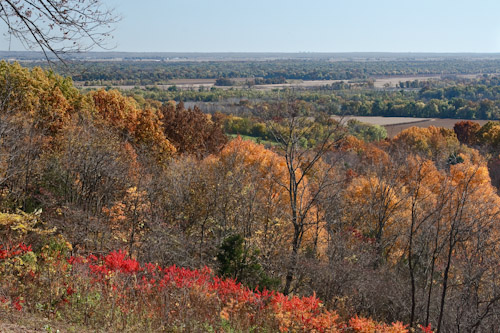
Today we received a reprieve from the rain that has been soaking the area, so we decided we were going to make the most of the blue skies and take in some of Illinois’ fall colors.  After much debate, we settled on going to Pere Marquette State Park by way of Alton, IL so we could purchase a couple cool mugs first.

The day started with us meeting up with my Aunt Jan in Alton so she could show us around Mississippi Mud (she is friends with the owners, and a faithful patron),  followed by a tasty pizza lunch before making our way up to Grafton via the Great River Road.  The drive was very scenic, with golden trees lining the road.  Combine that with the deep blue sky and you just couldn’t have asked for a better day.

Once in the park, we spent quite some time driving the Scenic Drive, stopping to take in the great views and let David run around.

IMG_1256

At one of the stops we came upon what may be the brightest, most vivid tree in the park.  It was just soaking up the sun and the colors almost didn’t look real.


IMG_1264

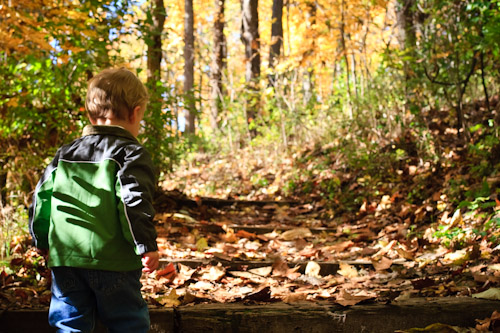
After the drive, we got out and went on David’s first Hike.  We decided to take a short one (.5 miles), but it was labelled moderate difficulty – something that didn’t slow David down much at all.  His little legs finally gave out just past the 1/4 mile mark, but he did all the uphill by himself!  Here he is approaching a set of steps.

IMG_1296

One thing we noticed, and was a little bit of a letdown, was that there wasn’t a whole lot of color.  There were plenty of yellow and orange, but not the deep reds that we have around here.


Great day, lots of fun.  More photos in the gallery.

Monitor Calibration with the Spyder 3 Pro

Over the past few years as I have gotten into photography more, I have been farily successful at ignoring the fact that my monitor(s) weren’t the best and probably weren’t outputting color correctly.  Every now and then I’d tinker with Adobe Gamma but give up after nearly going cross-eyed (you know what I mean if you’ve used that tool before).  So instead of having a good baseline color profile to edit photos with, I would just keep in mind the color casts or contrast issues my monitor has and try to adjust accordingly.  Photos would end up looking decent on my machine and a little crappy on others’ and in print.  I could live with that.

As I added multiple monitors to my PC, the situation became maddening.  I would get done tweaking an image, only to slide it to another monitor and have it look like crap.  Which one was correct? Or more accurately, which one was closer to correct?! 

So about a month ago I gave in and purchased the Datacolor Spyder 3 Pro, and I must say that I’m very happy with it.

It goes like this – after you install the software and drivers you’re asked to calibrate your monitor(s).  Monitor by monitor, you’re asked questions about the display controls you have available to you (brightness, contrast, etc) and are then instructed to attach the device to the screen at a location indicated by the software.  You can attach it with the built-in suction cup or by slinging the counter-weighted cable over the monitor and dangling it there.  I have only used the suction cup method and not bothered with dangling.

After getting the device positioned, the software cycles through the spectrum to figure out how your monitor is outputting color and what needs to be done to correct it.  When it’s done, the result is a system color profile that gets installed so that any “color managed” applications (fancy term for applications that know how to use color profiles) will display images more accurately.

The Spyder 3 Pro also keeps an app running in the background that uses the hardware device’s ambient light sensor to detect when the light has changed sufficiently that you’d need to recalibrate.  And finally, you can have it notifiy/remind you at sent intervals to reclibrate the monitor – because over time your monitor changes. 

Initial calibrations take 7 minutes per monitor, and those periodic reclibrations take 3.  I don’t have anything to compare this to, but have read that older models took considerably longer.

To date, I haven’t really found any negatives with this thing.  I am glad I purchased it, as it has taken alot of the second-guessing out of photo editing.  If you’re someone that has invested heavily in your camera equipment, computer and editing software, you seriously owe it to yourself to get one.

OK, that’s all.
Busch Stadium

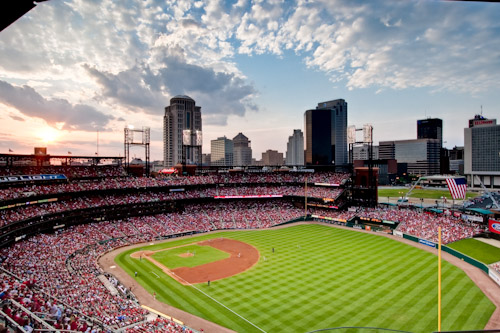
Friday night Ana and I were able to make it to our first Cardinals game of the year.  The weather was fantastic, the food was delicious, and the Cards handily defeated the Royals.  What a great way to spend a Friday night.

I of course took my camera and grabbed a few frames.  This is my first multiple exposure blend, courtesy of Photomatix, and I think it does a good job of capturing the great weather we had.  Click to enlarge.

busch