This post is part of an ongoing series related to how I use Adobe Photoshop Lightroom. If you haven’t read it yet, check out How I use Lightroom: Getting Photos In
In the previous post I described how I use the Import window. As I mentioned, I don’t exclude any photos at that stage. I bring everything in and then quickly make a pass where I figure out which need to be deleted.
Adobe Photoshop Lightroom is an excellent piece of software I’ve recommended to many of my friends who have been bitten by the photography bug. It catalogs and organizes all of my photos, allows me to quickly and efficiently edit them, and assists in pushing the end results for others to see. While on the surface it is targeted to professionals, I’m no professional and wouldn’t enjoy photography nearly as much without it.
Because it is so configurable, it is often very helpful to get a look at how others use its many features. So that’s what I’m going to do with this series of posts titled How I Use Lightroom. I won’t go to mind-numbing depth into every feature it has to offer, but instead will show you what I think is a very approachable and practical method for getting your money’s worth out of it.
So let’s get started with the first thing you need to do with it – get photos INTO lightroom.
This weekend we went downtown to the Old State Capitol Art Fair. I always enjoy the photography most of all (shocking, I know), seeing such a wide variety of styles and subjects helps to inspire as well as solidify what I do and do not like.
I also took the opportunity to try and get some more interesting photographs of the Old State Capitol. I didn’t end up with anything outstanding, but it felt good to just walk around and focus on this for a while.
The morning started off looking like it was going to rain, but cleared up shortly after I took this.
This one was from a week or so ago, but it fits the theme. It’s surely not the typical photograph of this building.
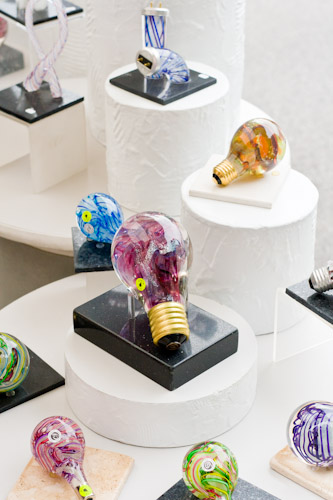
A colorful exhibit.
Here’s David taking a breather from all of the walking. He has about as much fun as a 3 year old can at an art fair.
A few weeks ago I imported photos from my iPhone into Lightroom 3. Ever since, I’ve had Lightroom crash on several occasions when I’ve gone to import photos off of a Compact Flash card. I’m running Windows 7, 64-bit. I was resorting to a reboot to clear it up, but tonight I had too much other stuff running that I didn’t want to stop for a reboot. So I started looking around.
I noticed that in Windows Explorer, there was a “phantom” iPhone appearing when my phone was definitely not plugged in. Here’s how it looked:
My theory is that Lightroom was trying to enumerate devices and was getting to this one and failing. Unfortunately there isn’t an option to Eject the device from here, so I turned to Devices and Printers in the Control Panel. In the list of devices, sitting down in the Unspecified section was one called Apple Mobile Device USB Driver. If you right-click and select Troubleshoot, Windows does a decent job at figuring out that there is no longer a device attached and removes it from the system. No more phantom iPhone.
I opened Lightroom back up, clicked Import… and Voila! Fixed!
Yesterday after work we went out to the fairgrounds to partake in the 2010 Illinois State Fair. Unlike the past 2 weeks, the weather was great and made for a very pleasant evening of walking around.
David got to see and touch many animals, as well as enjoy a Corn Dog and some Lemon Shake-Up. With the small crowds and great weather we were able to make our rounds to everything we usually do, with the exception of Conservation World which closes early. If this great weather continues we may just head back out there sometime this week.
On short notice, we decided to take a day trip to St. Louis today. When we first woke up this morning the weather didn’t look favorable, at 7am St. Louis was showing 94%+ humidity, so we figured we would just find something indoors. But on the way there the sky was overcast, the temperature wasn’t too bad, and the humidity had dropped – so to the zoo we went!
David had a really good time, he really wanted to see the Lions more than anything. He also really enjoyed all of the fish in the tanks he got to gaze into.
The cats are always a hit too.
It was alot of fun watching David get so excited – his last visit was exactly 1 year ago when he couldn’t express himself so well. Today he was sure to hop up for every exhibit, until he just got too tired near the end of the afternoon. We knew he was tired when he told his “No, I don’t want to see more elephants…”
And for the first time we can remember, we actually got to see the penguins outside. These went over very well
I’m doing a little photo and video editing as the weekend winds down and thought I’d post these for all 2 of you that follow this blog. Here’s David during his two games of bowling, in which he scored a combined 46! He gets emphatic about doing it himself, so those are 100% his.
And to wrap up the weekend, he took a few swings off of the tee.
Notice the goggles – apparently he forgot to take them off after his work in the lab.
Updated: embedded video from Vimeo instead of MotionBox.